

Who it’s for
Independent tradespeople and contractors, working alone or with one helper, who bill fewer than about ten clients a month from their phone and don’t run accounting software. Electricians, handymen, roofers and landscapers fit that picture; consultants, caterers and photographers can use the same invoice.
It is not bookkeeping software: there are no bank feeds, expense tracking, payroll or reports beyond what you’re owed.
How an invoice gets made
- Set up your business once: name, address, phone, email, logo, currency, tax rate and payment terms.
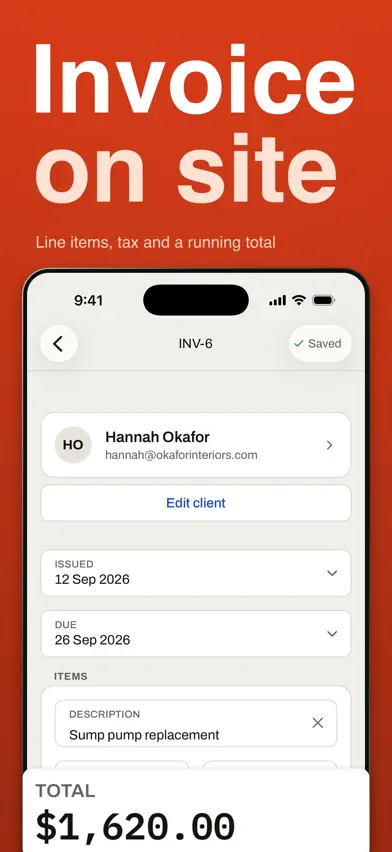
- Add the client, or pick a saved one.
- Add the lines: what you did, how many, at what price. Subtotal, tax and total update as you type.
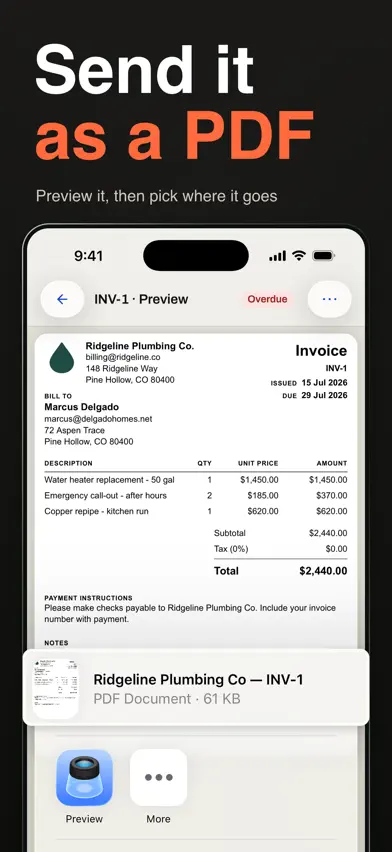
- Preview the PDF, then send it from the share sheet: Messages, Mail, AirDrop or Files.
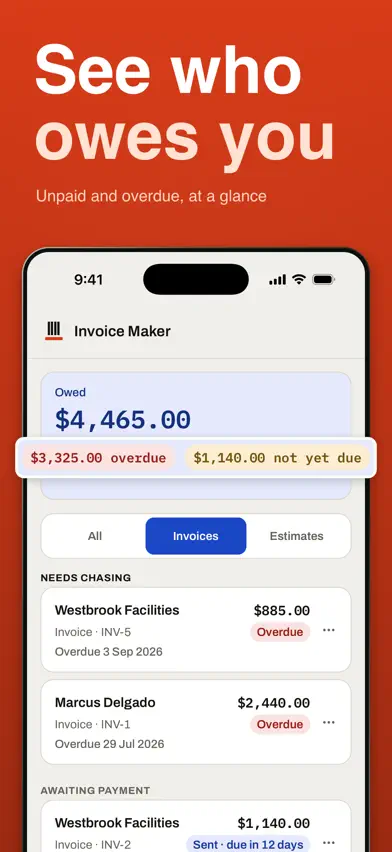
- Mark it sent, then paid. A sent invoice past its due date shows as overdue, and the home screen totals what you’re owed.
Estimates first, then the invoice
Make an estimate (numbered EST-1, EST-2 and so on) before the job. When the customer says yes, one tap turns it into an invoice with the same client, lines and tax, under the next invoice number. The estimate stays as it was, marked converted. Estimates never count toward what you’re owed.
What it does
- Makes invoices and estimates; estimates are numbered EST- and convert to an invoice in one tap (once per estimate).
- Set up once: logo, business name, address, phone and email, currency, default tax %.
- A Tax ID can be added in Settings > Business details; it prints under your contact details.
- Payment instructions (how to pay you) are set once in Settings > Invoice defaults and print under the totals on every invoice, not on estimates.
- Line items with a description, quantity and unit price; quantities take up to 3 decimals (e.g. 2.5 hours).
- One tax rate per invoice (0% to 100%, up to 2 decimals), with a tax label you can rename (for example Sales tax).
- Payment terms in Settings > Invoice defaults: Due on receipt, Within 7 days, Within 14 days (the default) or Within 30 days.
- A free-text notes and terms field prints at the bottom of the PDF; left empty, the section is left out.
- Preview the PDF, then send it with the iPhone share sheet (Messages, Mail, AirDrop, Files); the app never sends email itself.
- Status Draft, Sent or Paid; a sent invoice past its due date shows Overdue; the home screen totals what you're owed (estimates excluded).
- Duplicate any invoice or estimate into a new draft with today's date and a new number.
- Works offline: make, preview and share invoices and estimates without a connection.
What it doesn't do
- No recurring or scheduled invoices.
- No payment links or card payments; the app does not process payments.
- No partial-payment or deposit tracking; an invoice is unpaid or paid.
- No payment reminders or notifications.
- One currency per business profile; no multi-currency invoices.
- No discount lines.
- No per-line tax rates.
- No Android or web version on sale.
Plans and prices
Free to download, with in-app purchases. Entering your business details and first client is free; making invoices and estimates needs Invoice Maker Pro.
- YearlyUS$39.99a year, 7-day free trial for eligible new subscribers
- MonthlyUS$6.99a month, no free trial
Subscriptions renew automatically unless canceled at least 24 hours before the period ends; manage or cancel in Settings > your name > Subscriptions. Prices are in US dollars for the US App Store; the app shows your local price before you buy.
Screens from the App Store
Your data
- No account or sign-up
- No ads
- Your business profile, clients, documents and PDFs stay on your device; there is no cloud sync.
- The app collects usage analytics: which screens you visit, an approximate location worked out from your internet connection, and screen recordings with text and images hidden.
The app's full privacy policy is at klm-labs.github.io/invoice-creator/privacy/, and its terms at klm-labs.github.io/invoice-creator/terms/.